
Why Does My Gate Keeps Falling Unexpectedly
1. Wildlife Interference (Most Common Cause)
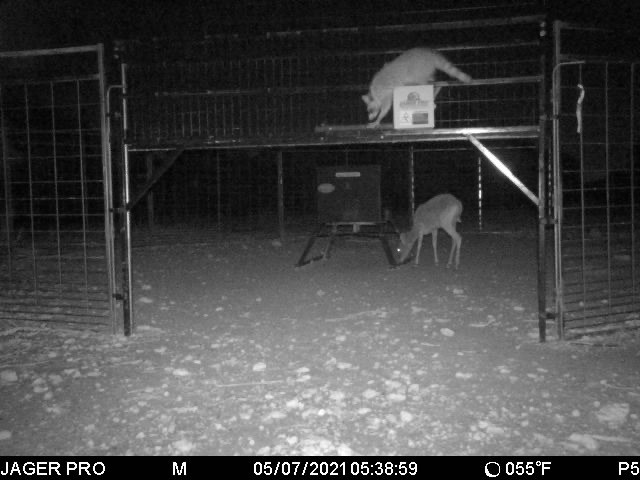
- Animals like raccoons and squirrels can trigger the gate
- They may run across the ledge and step on the trigger plate
- This causes the gate to drop even when you didn’t activate it
2. Signal Interference
- If the gate keeps falling at the same time every day, it may be caused by outside signals
- Nearby sources like:
- Pipelines
- Airports
- These can send out signals that interfere with your system
3. Other Trail Cameras
- Some cellular trail cameras (especially Cuddeback models)
- May operate on a similar frequency
- This can accidentally trigger your gate to drop
4. Daily Status Report Timing
- Some gate drops happen around midnight
- This is when cameras often send a daily status report
- Fix: Change the report time to early morning to reduce interference
5. Gate Setup Issues
- If the gate isn’t set correctly, it can fall too easily
- Even a small bump on the panel can trigger it
- Make sure:
- The locking mechanism is fully engaged
- The gate is set securely
How to Troubleshoot a Fallen Gate
Step 1: Reset the Receiver
- Hold the Pair/Transmit button for 6–8 seconds on the control box
Step 2: Re-sync Your Equipment
- Re-sync:
- Your camera
- Your on-site remote
Step 3: Test for Wildlife Interference
- Turn off power to the control box for a few days
- If the gate stops falling, wildlife is likely the cause
Step 4: Check for External Signal Issues
- Reset the receiver
- Do NOT re-sync the camera right away
- If the gate keeps falling, an outside signal may be causing it
Step 5: Swap Cameras (If Applicable)
- If you have multiple M.I.N.E.® cameras and the gate keeps falling:
- Swap them out
- This helps identify if a specific camera is causing interference
Still Having Issues?
- If the problem continues after all steps
- Contact JAGER PRO customer support for further troubleshooting
Last Update: 04.07.2026