
How to Share Your Camera with Other Users
When you share camera access, you can give others access to view or control it as either an admin or a guest operator, making it easy to collaborate and manage your setup.
Step 1: Make Sure They Have an Account
Before sharing access:
- The person must create their own account at my.jagerpro.com
- They also need to download the JAGER PRO® mobile app
⚠️ If you try to share your camera before they complete this step, it can cause errors because the system won’t recognize their account.
Step 2: Share Your Camera in the App
You can only share access through the mobile app (not the web portal).
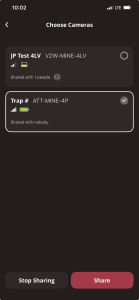
- Open the app and select the camera you want to share
- Tap the three-dot / three-line menu icon
- Select “Share Camera”
- Enter the user’s email address
- Choose their access level:
- Admin – Full control of the camera
- Guest – View photos only
- Tap Send Invite
The user will receive an email and must accept the invitation before gaining access.
Step 3: Accessing a Shared Camera
Once the invite is accepted:
- The user can open the app
- Navigate to the Shared Camera folder
- Your camera will appear there
Step 4: Manage or Update Access
To change permissions after you share your camera:
- Tap Account (bottom right of the app)
- Select Shared Camera Management
- Choose the camera
- Tap the user’s name to switch between:
- Admin
- Guest
If they haven’t accepted the invite yet, you’ll also have the option to resend it.
Step 5: Remove Access
If you need to remove someone:
- Go to Shared Camera Management
- Select the camera
- Find the user’s name
- Swipe left and tap Delete
By following these steps, you can easily share your camera, control access levels, and manage who can view or operate your system at any time.