
5 Powerful Insights to Easily Understand Your JAGER PRO® Camera Information Strip
Need help understanding the information strip or a specific code found on your JAGER PRO® camera? You’re not alone. Many users want a clear breakdown of what each symbol, letter, and number means when reviewing images. These details are essential for monitoring activity, especially when managing feral hog populations. This guide simplifies everything into five key insights so you can quickly and confidently interpret your camera data.
1. Trigger Codes Tell You How the Photo Was Taken
One of the most important parts of the information strip is the trigger indicator. The letter displayed reveals exactly how the image was captured. The most common is “M,” meaning motion triggered the photo, which helps identify when animals enter the camera’s detection zone.
Other codes provide additional control insights. “E” indicates a manually triggered photo, either during setup or through a scheduled event in the portal or mobile app. “S” means the image was requested via SMS, such as using the *500# command or requesting a photo remotely. “T” represents time-lapse mode, where photos are taken at set intervals. Lastly, “F” confirms the SD card was formatted through the mobile app.
2. Date and Time Pinpoint Exact Activity
Every image includes a timestamp showing the exact date and time the photo was taken on the information strip. For example, 07 April 2017 at 20:42:46 translates to 8:42:46 PM. This information is critical for identifying patterns in animal movement and determining peak activity times. Knowing when hogs are most active allows you to plan trapping and monitoring efforts more effectively.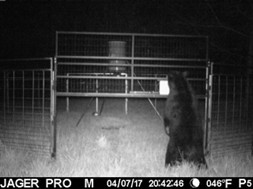
3. Moon Phase Helps Explain Animal Behavior
A unique feature of the information strip is the moon phase indicator. This shows the lunar phase at the time the image was captured, such as waxing gibbous, full moon, or waning crescent. Moonlight can influence wildlife behavior, especially for nocturnal animals like feral hogs.
The strip may display phases including new moon, waxing crescent, first quarter, waxing gibbous, full moon, waning gibbous, last quarter, and waning crescent. Understanding these phases can help explain changes in movement patterns and improve your overall strategy.
The Moon’s Phases Can Directly Affect Animal Behavior, New Research Reveals – The Debrief
4. Temperature Adds Environmental Context
Temperature is displayed directly on the image, such as 46 degrees Fahrenheit. This detail provides valuable environmental insight, as weather conditions can significantly impact when and how animals move. Colder temperatures may push animals to feed more frequently to maintain energy, while warmer conditions can shift activity to cooler parts of the day or night.
Temperature can also influence travel patterns, bedding areas, and how long animals remain active in a specific location. For example, feral hogs may move more during mild conditions but become less active during extreme heat or cold. By paying attention to temperature alongside other data points on the information strip, you can better understand behavior trends, anticipate movement, and make more informed decisions when reviewing images or adjusting your strategy.
5. Battery Level Keeps Your System Running
The battery indicator ensures your camera stays operational. A reading like “P5” means the batteries are fully charged and functioning at optimal levels. If the indicator drops below P5—ranging from P4 down to P0—it’s time to replace the batteries.
Regularly checking battery levels helps prevent downtime and ensures you don’t miss important activity. For additional details, users can reference the battery indicator information available through the mobile app.
Battery Indicator for Live Stream Cameras – JAGER PRO Store
By understanding these five essential insights, you can get the most out of your JAGER PRO® camera system. Each piece on the information strip plays a role in helping you track activity, improve efficiency, and make better-informed decisions in the field. For more detailed guidance, refer to the user manual or explore additional resources within the app.