
How to Fix a Gate That Won’t Drop
- Step 1: Check camera response
- Send a “Take Photo Now” command from the app
- If the camera does NOT respond, move to Step 2
- If the camera DOES respond, skip to Step 4
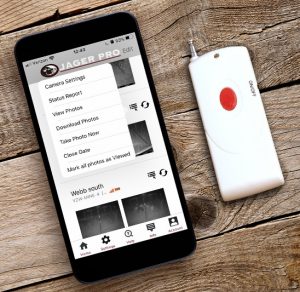
- Step 2: Verify the camera phone number
- Open the app menu (tap the 3 dots / 3 lines icon)
- Go to Camera Settings
- Select Wireless Settings
- Locate the assigned phone number
- Step 3: Confirm correct phone number
- Make sure a phone number is listed
- ⚠️ Important: This is NOT your personal phone number; it is the number assigned by JAGER PRO® for your SIM card
- If the number is missing or incorrect:
- Update it in the app, or check your JAGER PRO emails for the correct number
- Step 4: Test the on-site remote
- If the camera responds to commands, try using the on-site remote
- If the remote successfully drops the gate, continue to Step 5
- Step 5: Re-sync your system
- Re-sync your camera to the control box
- Follow the official syncing instructions provided by JAGER PRO®
- Step 6: Contact support if needed
- If syncing does not work
- Or the issue continues after all steps
- Reach out to JAGER PRO support for further troubleshooting
- Watch This Video To Help With Syncing Your Gate To Your Camera
Last Update: 04.06.2026